Accessibility Design System - WCAG AA
Accessibility is a regulatory requirement I treat as a design system problem, not a checklist. Leading accessibility research and design strategy and collaborating closely with development teams to ensure front-end implementation meets WCAG standards.
CLIENT
Accessibility
Role
Designer & PM
Service
Accessibility Design
Responsibilities
Key challenges involved implementing robust accessibility for complex interactive components while progressively integrating these enhancements into a large-scale legacy system without disrupting core functionalities
Responsibilities
Key challenges involved implementing robust accessibility for complex interactive components while progressively integrating these enhancements into a large-scale legacy system without disrupting core functionalities
Responsibilities
Key challenges involved implementing robust accessibility for complex interactive components while progressively integrating these enhancements into a large-scale legacy system without disrupting core functionalities
Approach
I directed the end-to-end accessibility design process, from research to code review, by serving as the key liaison between design and engineering to translate strategic requirements into compliant front-end implementation
Approach
I directed the end-to-end accessibility design process, from research to code review, by serving as the key liaison between design and engineering to translate strategic requirements into compliant front-end implementation
Approach
I directed the end-to-end accessibility design process, from research to code review, by serving as the key liaison between design and engineering to translate strategic requirements into compliant front-end implementation
Target
To achieve comprehensive digital accessibility for users with diverse disabilities by ensuring compliance with WCAG AA standards and attaining over 90% accessibility coverage for all core components
Target
Design a premium wellness service inside a gym tailored for affluent individuals aged 40-60 who are busy with successful careers, seeking to maintain a wellness lifestyle, and wish to share it with their families.
Target
To achieve comprehensive digital accessibility for users with diverse disabilities by ensuring compliance with WCAG AA standards and attaining over 90% accessibility coverage for all core components
Design target
In-Depth Understanding of Accessibility Guidelines and User Needs To build a comprehensive understanding of accessibility design, I focused on two key areas: "User Research" and "Internalization of Standards
User Need Insights: With limited project resources, I conducted literature reviews, delving into various academic reports and industry guides to grasp the core needs and behavioral patterns of users with different disabilities. Concurrently, I used contextual simulations (e.g., navigating with a keyboard with the screen off, operating the NVDA screen reader) to empathize with the real-world experiences and challenges users face with digital products.
Application of WCAG Standards: I systematically studied the WCAG 2.1 & 2.2 guidelines, not only to thoroughly understand the four core principles—Perceivable, Operable, Understandable, and Robust—but also to translate these abstract standards into concrete, actionable directives through case study analysis. This process fostered a shared consensus among team members (including designers and engineers) and ensured precision in both design and development

In-Depth Understanding of Accessibility Guidelines and User Needs To build a comprehensive understanding of accessibility design, I focused on two key areas: "User Research" and "Internalization of Standards
User Need Insights: With limited project resources, I conducted literature reviews, delving into various academic reports and industry guides to grasp the core needs and behavioral patterns of users with different disabilities. Concurrently, I used contextual simulations (e.g., navigating with a keyboard with the screen off, operating the NVDA screen reader) to empathize with the real-world experiences and challenges users face with digital products.
Application of WCAG Standards: I systematically studied the WCAG 2.1 & 2.2 guidelines, not only to thoroughly understand the four core principles—Perceivable, Operable, Understandable, and Robust—but also to translate these abstract standards into concrete, actionable directives through case study analysis. This process fostered a shared consensus among team members (including designers and engineers) and ensured precision in both design and development
In-Depth Understanding of Accessibility Guidelines and User Needs To build a comprehensive understanding of accessibility design, I focused on two key areas: "User Research" and "Internalization of Standards
User Need Insights: With limited project resources, I conducted literature reviews, delving into various academic reports and industry guides to grasp the core needs and behavioral patterns of users with different disabilities. Concurrently, I used contextual simulations (e.g., navigating with a keyboard with the screen off, operating the NVDA screen reader) to empathize with the real-world experiences and challenges users face with digital products.
Application of WCAG Standards: I systematically studied the WCAG 2.1 & 2.2 guidelines, not only to thoroughly understand the four core principles—Perceivable, Operable, Understandable, and Robust—but also to translate these abstract standards into concrete, actionable directives through case study analysis. This process fostered a shared consensus among team members (including designers and engineers) and ensured precision in both design and development
Work Highlight
Establishing a Clear Information Architecture Foundation
I believe that a clear architecture is the cornerstone of accessibility. During the planning phase, I employed the following strategies to ensure the content organisation and navigation paths were intuitive and easy to use for everyone:
Semantic Heading Structure: I collaborated with the content team to establish a strict strategy for using headings
<h1>through<h6>. This ensures a clear hierarchical structure, allowing screen reader users to quickly scan, understand, and navigate the page.
Clear Page Landmarks: I leveraged HTML5 semantic tags (e.g.,
<main>,<nav>,<footer>) and ARIA roles to define the main regions of a page. This provides assistive technologies with shortcuts, such as a "skip to main content" function. Efficient Skip Links: I implemented skip links at the top of the page, allowing keyboard-only users to bypass repetitive navigation blocks and go directly to the core content, significantly improving operational efficiency.
Consistent Navigation Design: I ensured that navigation patterns, behaviours, and placement remained consistent across the entire site, reducing users' cognitive load and learning curve.
Image source : Mozilla-ARIA landmark

Integrating Accessibility into the Design System
To ensure compliance from the ground up, I collaborated with the development team to build accessibility standards directly into our design system, making them the default for all UI components:
Systematic Component Specifications: For each UI component, we predefined its ARIA attributes, keyboard interaction patterns, minimum click/touch target sizes, and color contrast ratios to meet WCAG AA standards. This transformed accessibility requirements into actionable development criteria.
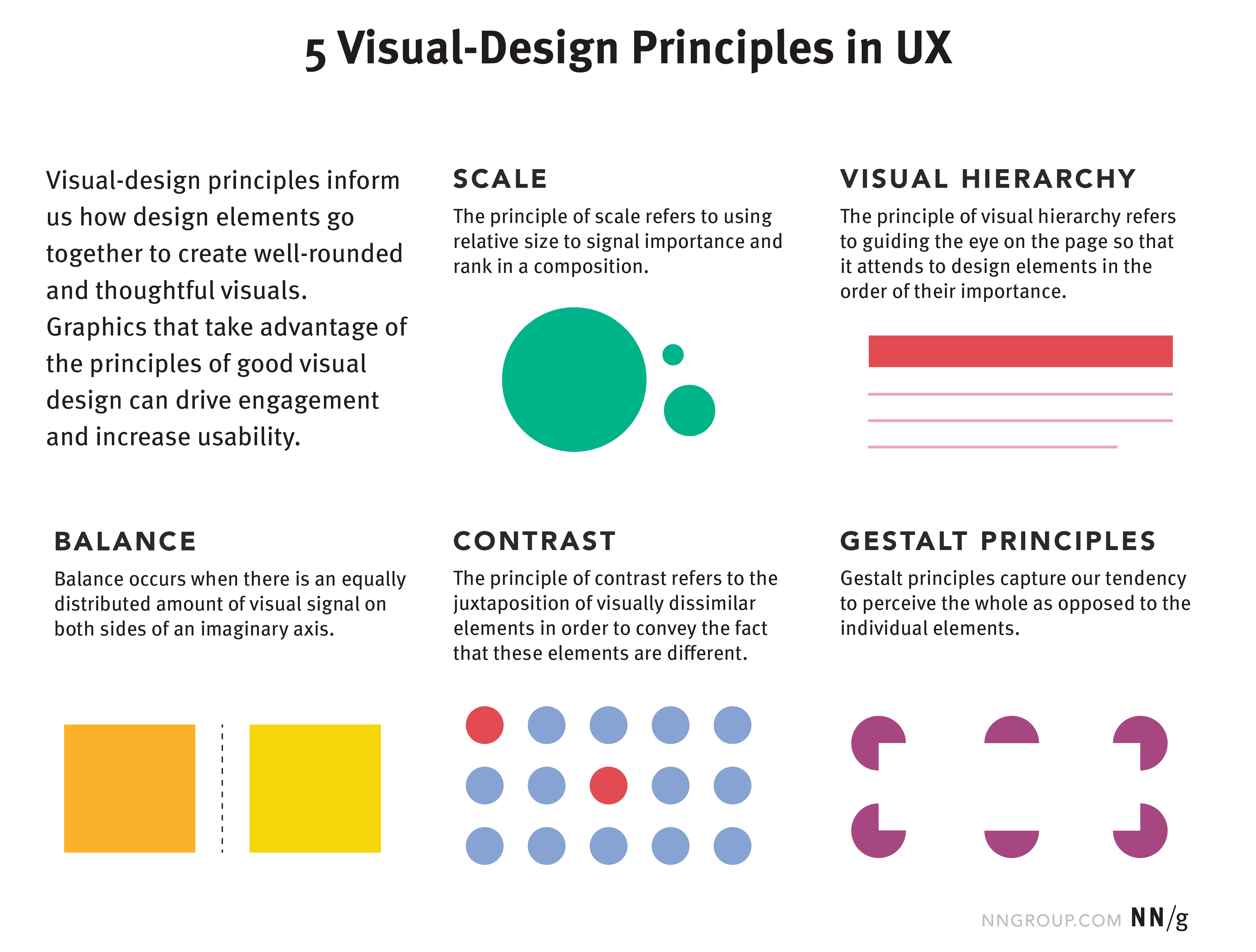
Color and Contrast Management: All visual elements, including text, icons, and interactive components, were designed to adhere to WCAG's contrast requirements, ensuring that information remains clear and legible across different screens and zoom states.
Image source : NNGroup 5 visual-design principles
Establishing a Clear Information Architecture Foundation
I believe that a clear architecture is the cornerstone of accessibility. During the planning phase, I employed the following strategies to ensure the content organisation and navigation paths were intuitive and easy to use for everyone:
Semantic Heading Structure: I collaborated with the content team to establish a strict strategy for using headings
<h1>through<h6>. This ensures a clear hierarchical structure, allowing screen reader users to quickly scan, understand, and navigate the page.
Clear Page Landmarks: I leveraged HTML5 semantic tags (e.g.,
<main>,<nav>,<footer>) and ARIA roles to define the main regions of a page. This provides assistive technologies with shortcuts, such as a "skip to main content" function. Efficient Skip Links: I implemented skip links at the top of the page, allowing keyboard-only users to bypass repetitive navigation blocks and go directly to the core content, significantly improving operational efficiency.
Consistent Navigation Design: I ensured that navigation patterns, behaviours, and placement remained consistent across the entire site, reducing users' cognitive load and learning curve.
Image source : Mozilla-ARIA landmark
Integrating Accessibility into the Design System
To ensure compliance from the ground up, I collaborated with the development team to build accessibility standards directly into our design system, making them the default for all UI components:
Systematic Component Specifications: For each UI component, we predefined its ARIA attributes, keyboard interaction patterns, minimum click/touch target sizes, and color contrast ratios to meet WCAG AA standards. This transformed accessibility requirements into actionable development criteria.
Color and Contrast Management: All visual elements, including text, icons, and interactive components, were designed to adhere to WCAG's contrast requirements, ensuring that information remains clear and legible across different screens and zoom states.
Image source : NNGroup 5 visual-design principles
I collaborated closely with multi-disciplinary teams—including front-end engineering, QA, and legal—to establish a comprehensive workflow from development to acceptance. This process ensures that the accessibility standards defined in the design specifications are precisely implemented in the final product.
This project honed three core competencies:
Deepened User Empathy: I developed genuine empathy by moving beyond abstract rules to hands-on simulation of real-world user scenarios and assistive technologies.
Design & Engineering Bridge: I became adept at bridging the gap between design and engineering, ensuring accessible design intent is translated into code with high fidelity.
Cross-Functional Collaboration: I successfully established a collaborative workflow across design, engineering, and QA teams to efficiently implement accessibility projects.


Feedback definition
This project honed three core competencies:
Deepened User Empathy: I developed genuine empathy by moving beyond abstract rules to hands-on simulation of real-world user scenarios and assistive technologies.
Design & Engineering Bridge: I became adept at bridging the gap between design and engineering, ensuring accessible design intent is translated into code with high fidelity.
Cross-Functional Collaboration: I successfully established a collaborative workflow across design, engineering, and QA teams to efficiently implement accessibility projects.
Feedback definition
This project honed three core competencies:
Deepened User Empathy: I developed genuine empathy by moving beyond abstract rules to hands-on simulation of real-world user scenarios and assistive technologies.
Design & Engineering Bridge: I became adept at bridging the gap between design and engineering, ensuring accessible design intent is translated into code with high fidelity.
Cross-Functional Collaboration: I successfully established a collaborative workflow across design, engineering, and QA teams to efficiently implement accessibility projects.